
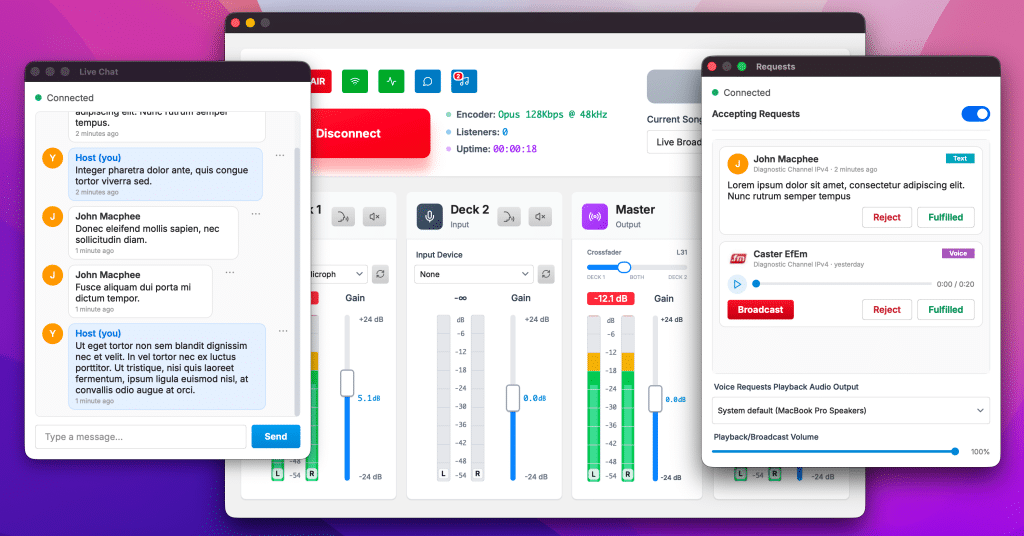
Broadcasting has always been a bit of a one-way street: you talk, they listen. With version 1.0.4 of Caster.fm Broadcaster, we’re tearing that wall down. Your show is now a two-way conversation — and your listeners can literally become part of the broadcast. This release brings live in-app chat, a full song & voice requests workflow, and the feature we can’t stop playing with: broadcasting a listener’s voice request straight into your live stream with a single click.
💬 Live chat, right in the app
No more juggling a browser tab to see what your audience is saying. The new Chat panel lives inside the broadcaster itself and updates in real time, so you can read messages the moment they arrive and reply as the host without ever leaving the app. Recent history loads automatically when you open it, and built-in moderation tools let you clean up the room when you need to. It’s your studio talkback channel, right where you’re already working.
🎵 Requests, managed like a pro
The new Requests badge at the top of the main window opens a live queue of everything your listeners are asking for. You can toggle requests on or off per channel, work through the queue newest-first, and fulfill or reject each one in a click — with your listener notified automatically. Requests arrive as text or voice, and voice requests come with an inline player so you can privately preview them before deciding what to do.
🎙️ The headline: broadcast a voice request with one click
Here’s the one we’re proudest of. When a listener sends a voice request, you don’t just read it — you can play it live, straight into your broadcast, with a single click. No routing, no virtual cables, no fiddling: your music smoothly ducks so the caller comes through clean and lifts back up when they’re done, a breathing red indicator and live progress bar show you exactly what’s on air, and you can cut a message off any time if you need to move on. It turns your listeners’ voices into part of the show — call-in radio energy, without a phone line in sight.
Availability
These features are available exclusively to Cloud Plus subscribers. Once you’re on Cloud Plus, the app detects your entitlements at login and lights up the Chat and Requests panels automatically.
Update to version 1.0.4 and go say hi to your listeners — then put them on the air. 🎧